Cover Image for Ambi Project

Improving Chairside Braces Bonding at LightForce

Orthodontic Clinics and Patients do typically want the same thing: to get in and out through their doors as quickly as possible. How do we help achieve that?
Overview
Role
Product Designer
Team
Myself, Deb Smithline, & the Product Team at LightForce
Duration
2023 - 2024
Problem
LightForce
LightForce is an orthodontic braces manufacturing company who specialize in the novel 3D printing of braces to allow for fully custom individualized braces for each patient. Our primary customer base is directly with orthodontic practices and during my tenure I was involved in the design of both internal and external software solutions.

This project is one of many improving on the legacy software that the orthodontic practices were using as their primary interface with LightForce.
A better chairside bonding experience
In many practices the use of a computer by the patient chair during an appointment is quite common. They are primarily used to access the various digital tools now in common use throughout the orthodontic space whether it be patient management software or in the case of LightForce, our 3D digital workspace.

Prior to this project, said workspace was effectively the same experience used by orthodontists to plan and submit orders to LightForce. While functional, it was not designed explicitly for chairside appointment use and not for the individuals spending the majority of the time in this use-case, the clinical assistants.

The appointment in which a patient first has their braces put in, the bonding, was of particular note. As one of the most important and complicaetd appointments of any patient, the usability of the 3D workspace during this appointment was a ripe opportunity to focus on for improvements.
Insights
Two primary improvements were noted during the discovery phase of this project, both from discussions with assistants from our partner practices and some long standing suggestions from our other feedback channels.
Our existing information delivery method was inadequate
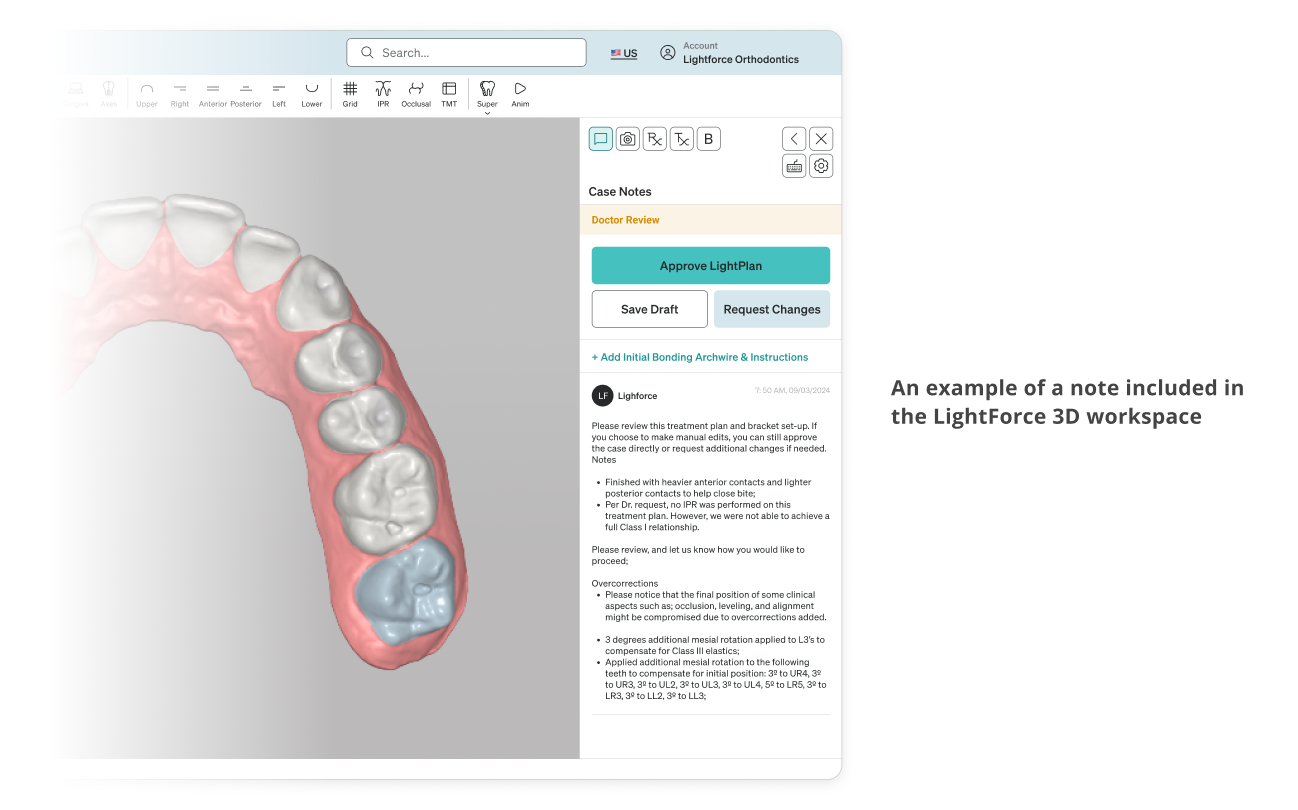
The primary method LightForce used before to deliver information while in the 3D viewer was simply in a comment on the right-hand side panel within the experience. These comments were generated automatically and consisted of only text.
Information was dense and could be hard to parse. Of note was anything relating to information regarding teeth that would impact the typical bonding flow of the assistants. This information was often buried in what was effectively a wall of digital fine print.
Reorders would liked to be placed during the visit
Mistakes are sometimes made or delivered braces may fail during the bonding process. We provided a second set of backup braces in every patient's kit for these events but that does result in needing to reorder replacements for the used backups.

This required notes to be taken (literally or mentally) during the appointment and only after the patient had left the chair could they enter the appropriate form on our portal. The ability to place a reorder or at least mark which teeth needed to be reordered was a frequent request up to this project's inception.
Design
Early Exploration
Early explorations focused on a establishing the concept of a Bonding Visit workflow in the 3D environment. This would be the first of the concept of Visits in general within LightForce. These would be the dedicated workflows built for chairside use.

The main primary addition within the 3D workspace would be the addition of the tooth chart. This chart would display both information and serve as a form to mark which braces would need to be placed in a reorder and why.
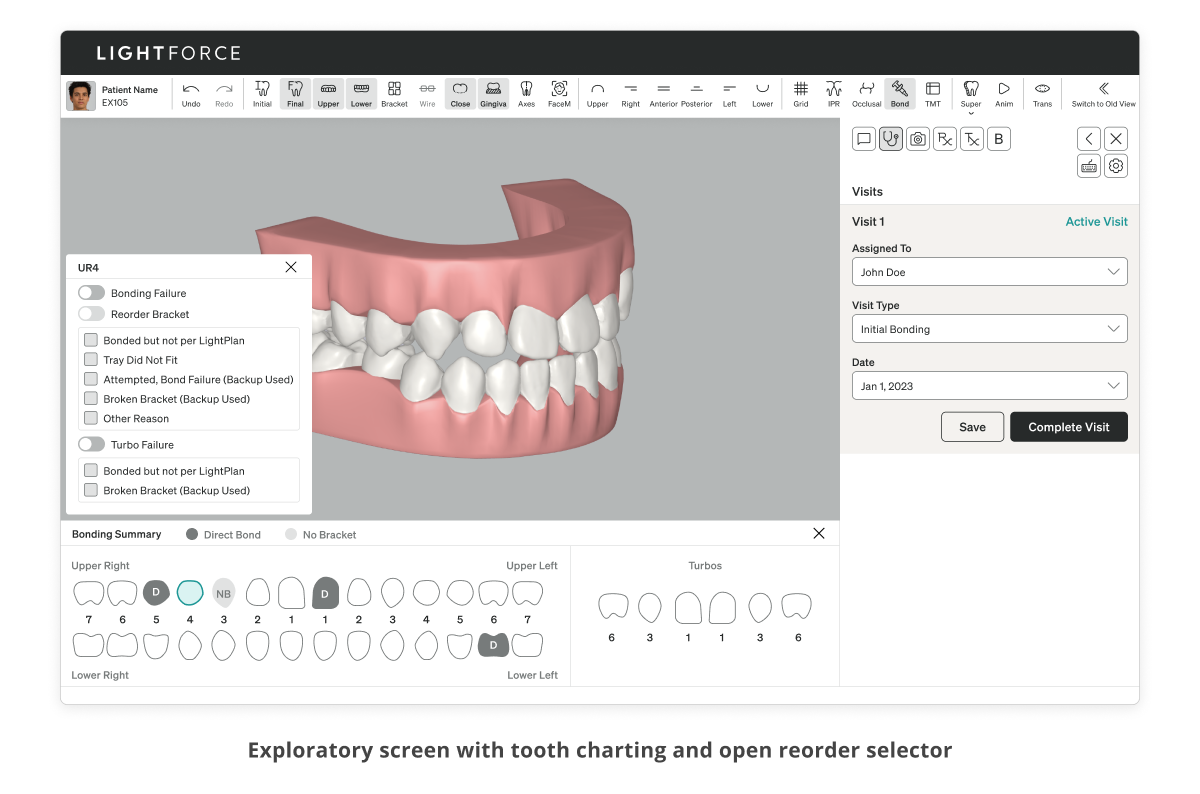
As the right-hand toolbar in the 3D workspace was already recognized as the action area by our users and now free of being needed to showcase tooth information, specific visit level actions would populate this real estate. These early explorations only contained simple data gathering: who was the bonder, what was the visit for, and when.
More Steps and Refinement
Following feedback from both internal teams and discussions with some partner practices two discrete steps were added, Chairside and Summary. The summary would allow for a final review before submission and automatically place a reorder for any brackets marked during the Chairside flow.

Additionally any marked brackets were appear in a dynamic list within the right hand side during the Chairside step as a sort of shopping cart for reorders.
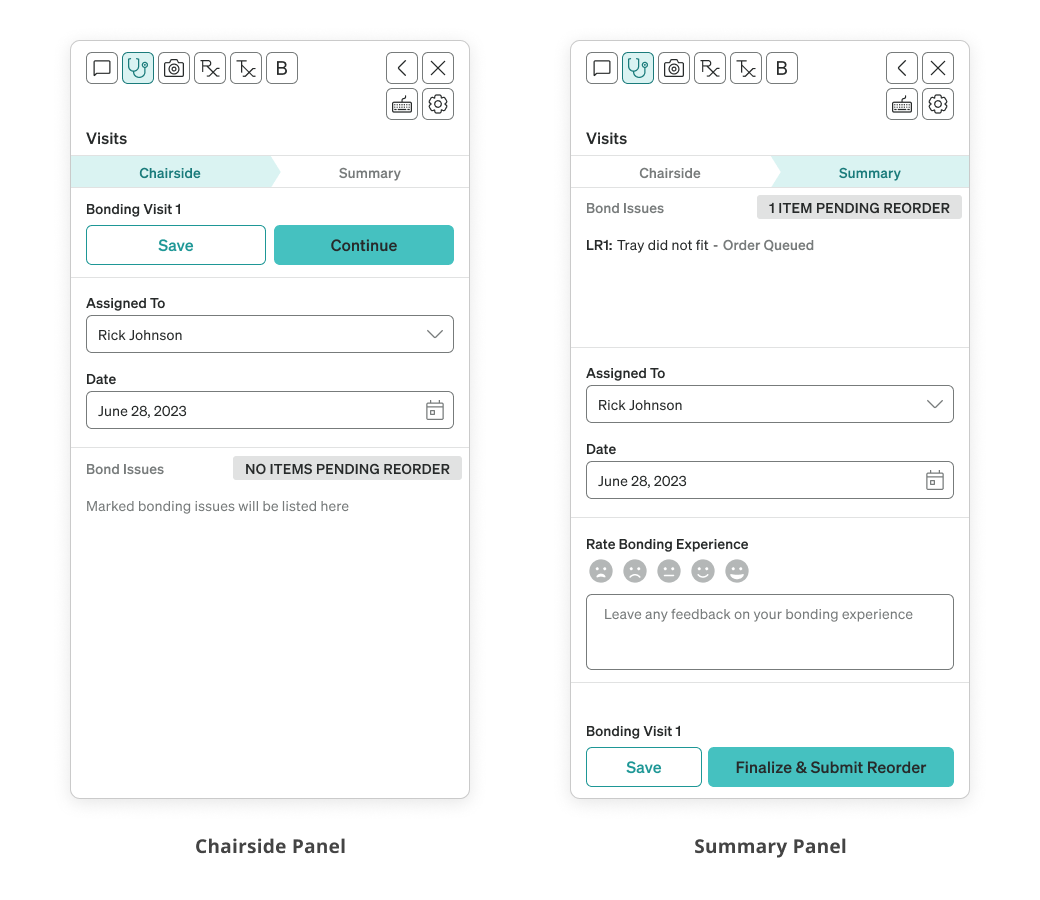
This would be the version to be developed into our first beta test which was rolled out to select practices for validation.
An Additional Stage and Beyond
An early suggestion in the beta by our testers was the inclusion of an additional step prior to the Chairside step. We learned that a number of orthodontists had either a briefing meeting with their team prior to a patient's bonding or otherwise wished to leave instructions or notes about the patient prior.

Thus a 'Prepare' step was added to allow notes / instructions to be placed. The general bonder information was also moved here so the real estate on Chairside could now be used for these instructions.
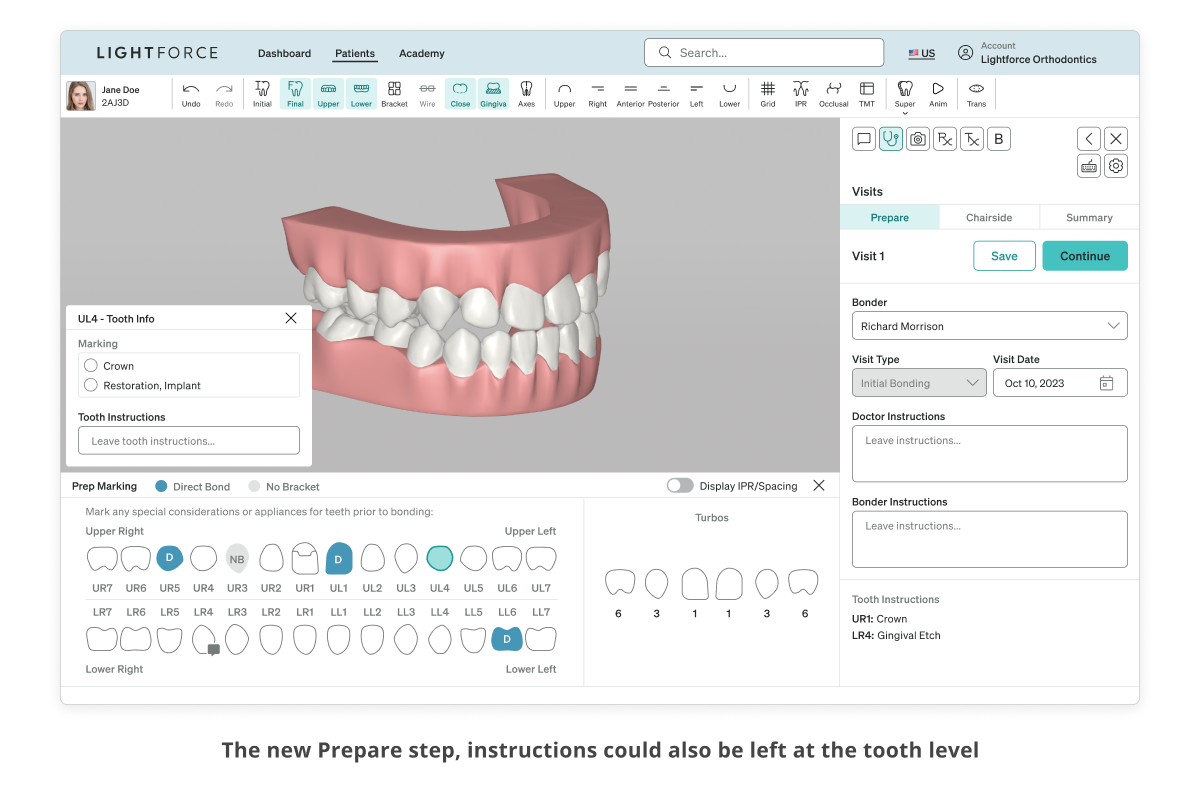
Another learning was that at this point we were gathering effectively the same information that an orthodontist would enter into their patient management software. To cut down on duplicate work a 'Copy Summary' button was added on the Summary step to allow practices to simply copy and paste this information quickly.
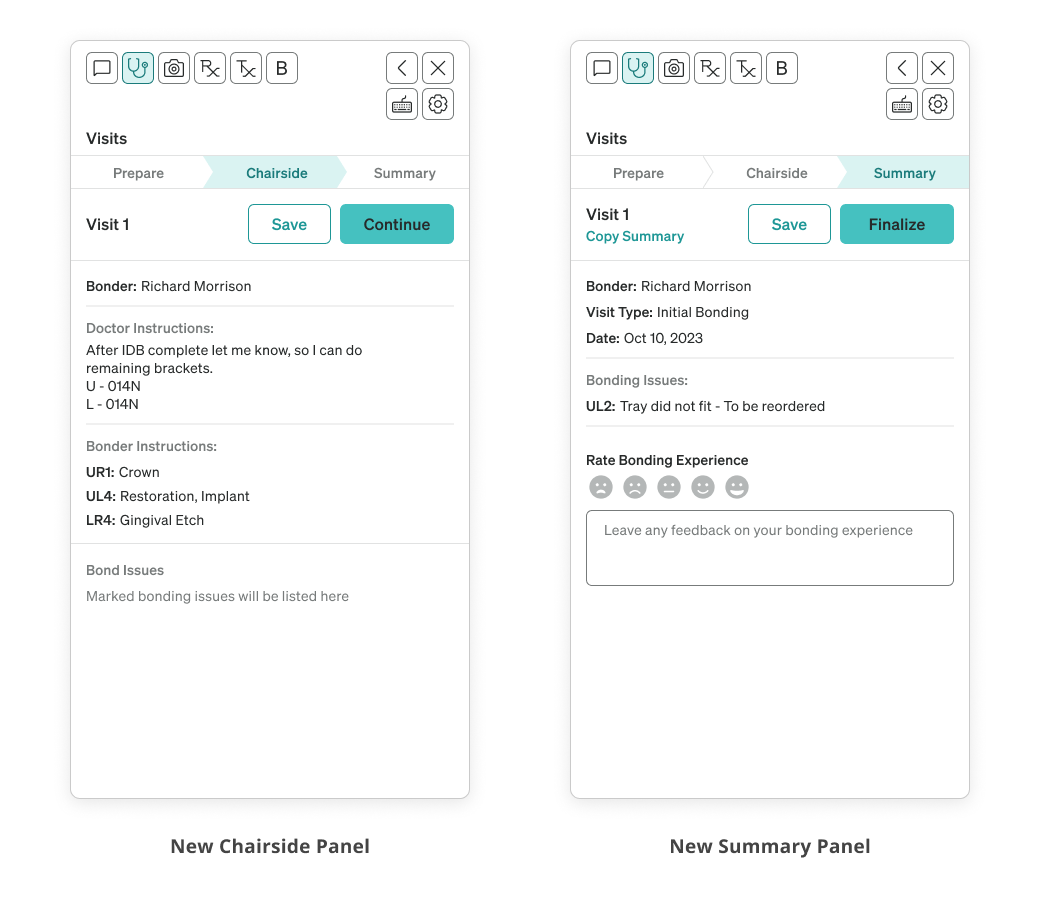
With these changes and overall positive reception, the overall beta period was considered concluded and the project was ready to head into general availability with all of our clients.
General Release and Further Improvements
Once released generally to all of our clients further improvements and suggestions naturally followed. While like with our testers the new flows were well received and proved popular there was still ample room for improvement.

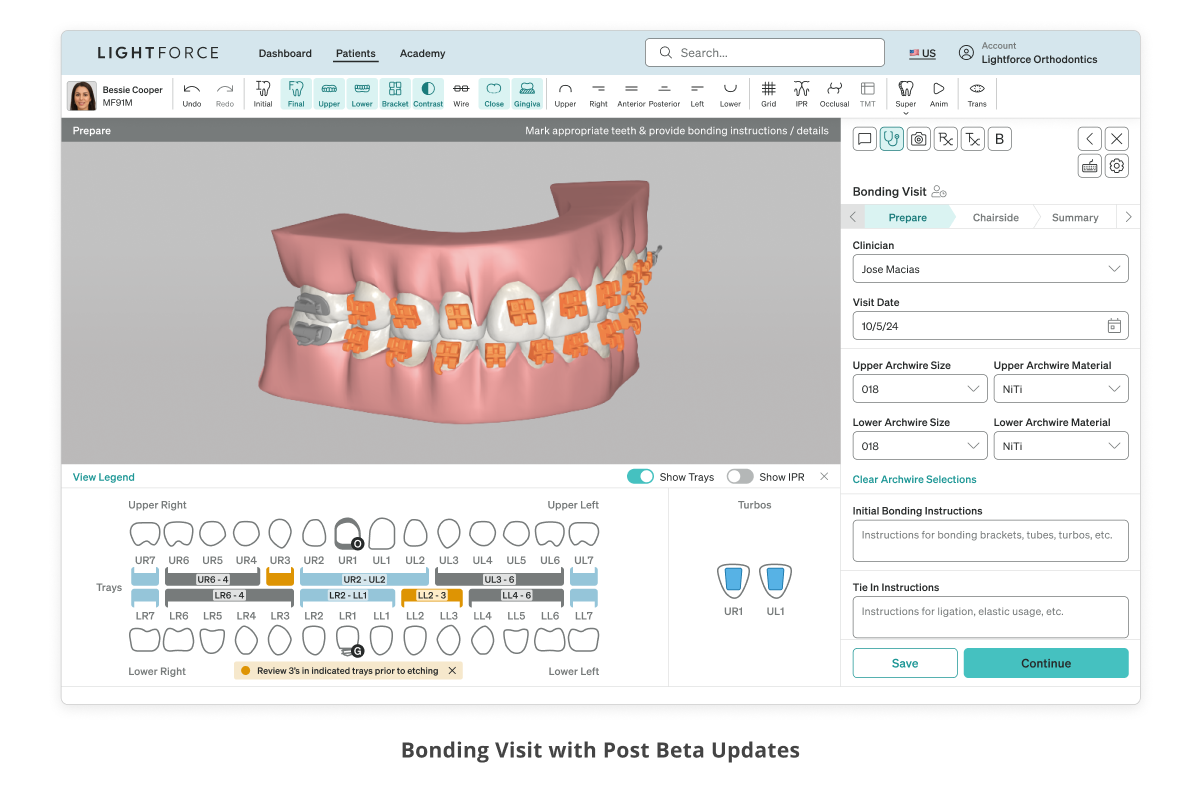
Over the course of several months additional features were rolled out to the Bonding Visit, and while not exhaustive they included the following:
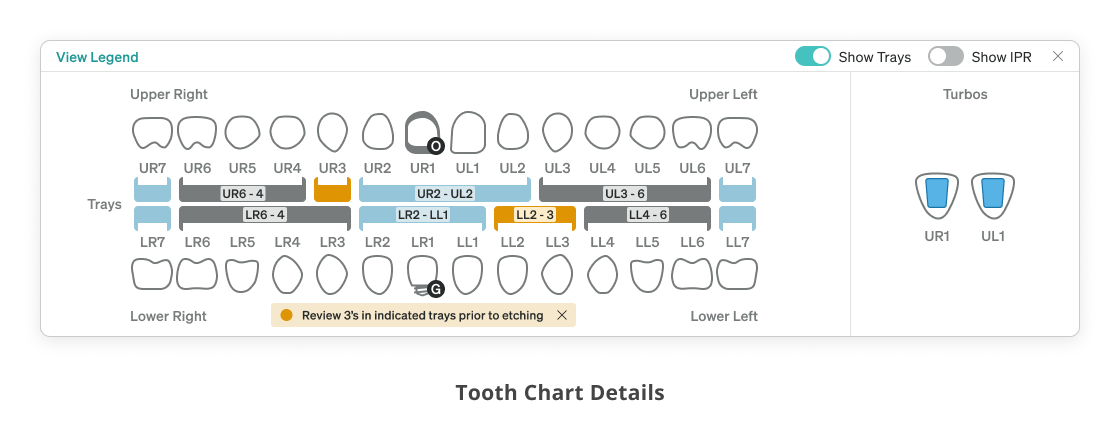
  • Additional indicators on the tooth chart to indicate offset bracket placement
  • More information inputs on the Prepare step to include more hardware and dates
  • Simplification of the 'Turbos' display on the tooth chart
  • The addition of marking bonding trays (custom trays used in bonding to place multiple braces) on the tooth chart
Many more smaller changes and adjustments were made as well over this period and there still exists ample opportunity for even more improvements to come.
Afterword
Results
Overall the project was highly successful closing many gaps in LightForce's product offering for a key moment in the lifecycle of the product, the actual application of the printed braces onto the patient.
This project overall was also noted as a particular differentiator from other dental software as one of the first projects our testers had experienced focused solely on orthodontic workflows rather than all-encompassing dentistry.
The Bonding Visit workflow achieved a particularly high adoption rate across our userbase, especially as ultimately it is an optional flow as practices can simply choose to not engage with our software beyond ordering and receiving braces.
80% Adoption
Achieved across 900 practices
Additionally as not all practices actually use computers next to the patient, a certain percentage of non-adoption may be attributed to this as well, although this metric was not studied in depth.
Beyond
With the conclusion and success of the first major Visit to be implemented within LightForce's software, this sets the groundwork and potential structure for future flows dedicated to other types of appointments a practice may take beyond just the initial bonding. Overall this was the first step into a vision of LightForce's software suite to move beyond simply just providing braces and to become more integrated with the full user journey of the patient.
Always down to get in touch! 👍
Copyright © Victor Zhu 2025 All Rights Reserved